In the app
For iPhone and iPad.
Designed for iPad
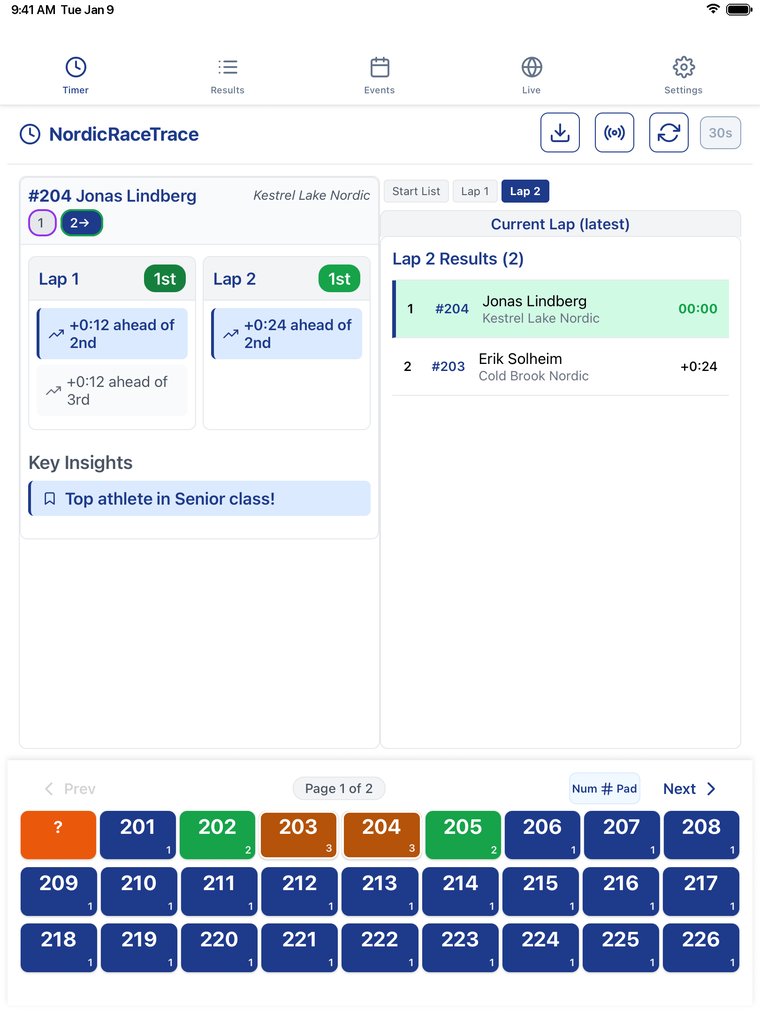
Not a phone app stretched to fit. On an iPad the timing pad, your athletes' laps and gaps, and live results share one screen, so you see the whole race at a glance. Laid out for every iPad, from iPad mini to the 13-inch iPad Pro.
Split Timing
Record splits as skiers pass anywhere on the course. Every start format works: interval starts at 0, 15, 20 or 30 seconds, mass, wave and pursuit, or the start times from your start list. Place and gaps show the moment you enter a bib.
Race Timing
Finish-line timing for small races, or as a backup to the official timing. Press Impulse the instant a skier crosses and add the bib after, so a busy finish never costs you a time. FIS start-sequence audio, ties ranked as ties, and a second phone can join as co-timer.
Team Time Trials
Time your own roster by name, no bibs needed. Build the start list from your roster, set pursuit starts from an earlier trial, and run it on several phones: one counts down the starts while the others time the finish. Guests can race too, and every trial saves to your team’s season.
Four Ways to Enter a Bib
Number Pad: type the bib and press Enter.
Bib Press: tap the bib on screen.
Voice Entry (beta, Split Timing): say the bib, then “enter” as the skier passes, and hear the place and gap read back in seven languages. Your gloves stay on.
External Timer (beta, Race Timing): connect a Summit timer over Bluetooth and its times come straight in, to the hundredth.
Start Lists From Anywhere
Paste a link to a race website or PDF and it is read for you. Photograph a printed start list, up to six pages at once. Or load a CSV file, type the list in, or pick a race from nordicracetrace.com. Bibs, names, teams, classes and start times come in ready to time.
Key Insights
See whether a skier is gaining or losing places against the skiers who have actually come past, which racer they just caught, the gaps ahead and behind, and who leads your team and each class.
Team & Athlete Highlighting
Add your team names so your athletes stand out in every list, and highlight up to five individual athletes to follow them through a race.
Live Results and Publishing
Share a live results page anyone can follow in a web browser, or publish the results when the race is over and send the link. Split Timing sessions can go to your team page.
Your Race Is Safe
If the app crashes or is force-quit, reopen it and the clock, times and start list pick up where they were. Setup is kept apart from starting the clock, so a race can’t start by accident, and you are warned if the phone’s clock changes mid-race.
Edit and Export Results
Tap any result to edit, reassign or delete it. Export results or the start list as CSV or text to share by message or email.
On nordicracetrace.com
The website works alongside the app, in any browser.
Start List Library
Browse start lists from upcoming races, or turn a timing site, PDF or photo of a posted list into one. Publish it for every coach at the race, or keep it private for your team.
Browse start listsResults Pages
Every shared race has its own results page with splits, places and gaps, updating live as times come in. Anyone can follow along or download the results as CSV.
See published resultsTeam Pages
Sign in with Apple or Google to keep your roster, build time trial start lists, and follow every trial across the season with standings and personal bests.
Go to your teamTraining Logs
Replace the team spreadsheet. Athletes log every day, and coaches see the whole team at a glance.
Athletes log their training
Athletes sign in with Google and fill in each day: hours by activity (classic and skate skiing and rollerskiing, running, biking, SkiErg and more), strength, time at L3, L4 and L5, sleep, how they felt, and comments. Totals and training stress add up on their own, and athletes can record their own time trials.
Coaches review and comment
The team overview shows each athlete’s days and hours this week, their last entry and their most recent trial. Open any log to read the week, leave a note, and set planned hours for the week or the season. Athletes get one email each evening with any new notes.
The whole season
Charts show weekly and cumulative hours across the season. Download an athlete’s log as Excel or CSV, or the whole team as one Excel workbook. The season starts on whatever date you choose.
Reminders and sharing
When an athlete logs fewer than three days in a week, they and their coaches get a reminder email. Mute reminders for an injured athlete with one click. A log can also be shared with another coach, to view only or to view and leave notes.
To start: create your team on nordicracetrace.com, add your athletes’ email addresses to the roster, and open Training Log from the team page.